
The basics shared by everyone — sign-up, login, language, notifications and installing the app.
1. Sign up (phone verification)
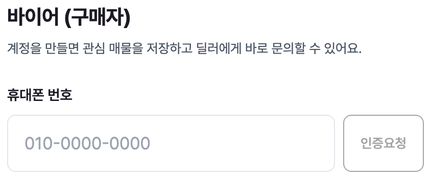
Sign-up starts with phone verification. Each field appears as you complete the previous one.
- 1Enter your phone number and tap “Request code”.
- 2Enter the 6-digit code from the SMS and tap “Confirm” — you’ll see “Phone verified ✓”.
- 3Enter your email, a password (6+ characters) and confirm it.
- 4Enter your nationality, main export country and name, agree to the terms, and you’re done.
No code arrived?
Sign-up requires a Korean mobile number that can receive SMS. Wait 1–2 minutes, then tap “Resend”. If the number is already registered, you’ll be told so — just log in instead.There are individual (buyer) accounts and dealer accounts. Dealers need extra business verification (see “For dealers”).
2. Login & Face ID
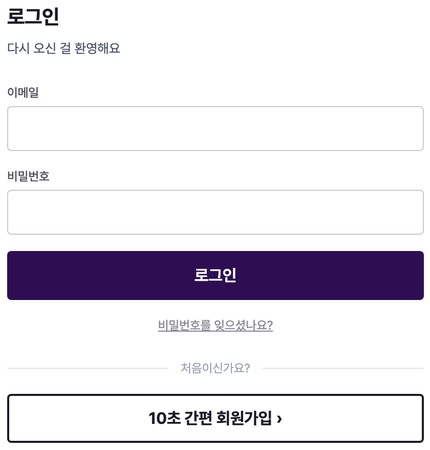
Log in with your email and password. In the app you can enable Face ID / biometrics for quick login once set up on your device.
3. Reset password
- 1On the login screen, tap “Forgot password?”.
- 2A reset link is emailed to you. Open it and set a new password.
4. Change language
Use the language menu at the top to pick Korean, English, Russian, Arabic or Mongolian. Most labels — including specs and verdicts — switch to your language.
5. Install the app
Use the iOS/Android app, or add the site to your home screen from a mobile browser to use it like an app. The app has the same features as the web and can deliver push notifications such as inquiry replies.
6. Notifications
Notifications collect in the in-app Alert center (bell icon); you can turn each channel on or off in settings.
In My page → Alert settings, manage your email, SMS and app push, then tap “Save”. You can also get an SMS when a car matches your saved criteria.
7. Account settings & deletion
In My page → Account settings, manage your profile and contact details. To delete your account and data, use “Account & data deletion” in the footer.